Product
New Mailgun Zapier Integration: Validations, alerts, and AI-powered workflows

Build cleaner lists, faster responses, and smarter automations—without code.
What’s new
- Validations: Validate single addresses or bulk lists directly in Zapier, then use results to update your CRM, segment lists, or flag risky addresses.
- Alerts: Subscribe to validation events (all plans) and deliverability alerts (Optimize plan) such as IP/domain blocklist or reputation changes—so you can act fast.
- Routes: Trigger workflows from inbound emails and apply dynamic logic based on content, keywords, or sender—perfect for support intake and prioritization.
- CLI foundation: A modern, more reliable integration that’s easier to evolve with new features and templates.
Four AI-powered workflows you can build today
With Mailgun for Zapier 2.0, you can now combine email events (like validations, alerts, and inbound routing) with AI to interpret what’s happening and decide what to do next.
Here are four real examples of how customers are already using this — and how you can, too.
1. Validate HubSpot form emails before they hit your CRM
Without validation, form fills can create bad CRM data and inflate lists with throwaway or risky addresses.
Now, when someone submits a HubSpot form:
- Zapier automatically sends the email address to Mailgun for validation.
- AI reviews the result and summarizes it in plain language:
“valid — belongs to a real company domain” or “invalid — disposable email detected.”
- If the email is legit, the contact is created/updated in HubSpot.
- If not, HubSpot flags or suppresses it — protecting your sender reputation.
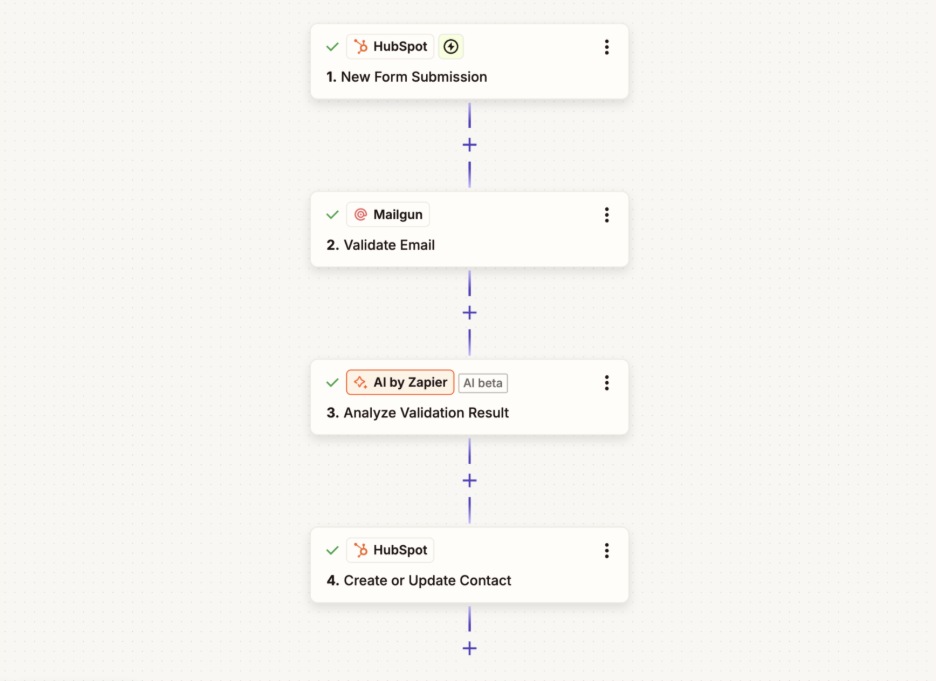
Starter template for validating new HubSpot form emails (no AI):
- Just add an AI step in Zapier to interpret and summarize the validation.
2. Route inbound customer replies to the right team — automatically
Mailgun Routes now trigger Zapier workflows when a real email hits your inbox — not just events from sends.
Example: A customer replies with “I have a billing issue about my invoice.”
- Zapier sends the email to AI.
- AI determines intent: billing, support, technical, sales, spam.
- The email is routed to the correct destination system (Zendesk, Jira, HubSpot, etc.).
- A short AI-generated summary appears in Slack so the team sees context immediately.
This turns a messy shared inbox into a smart intake system, powered by your email.
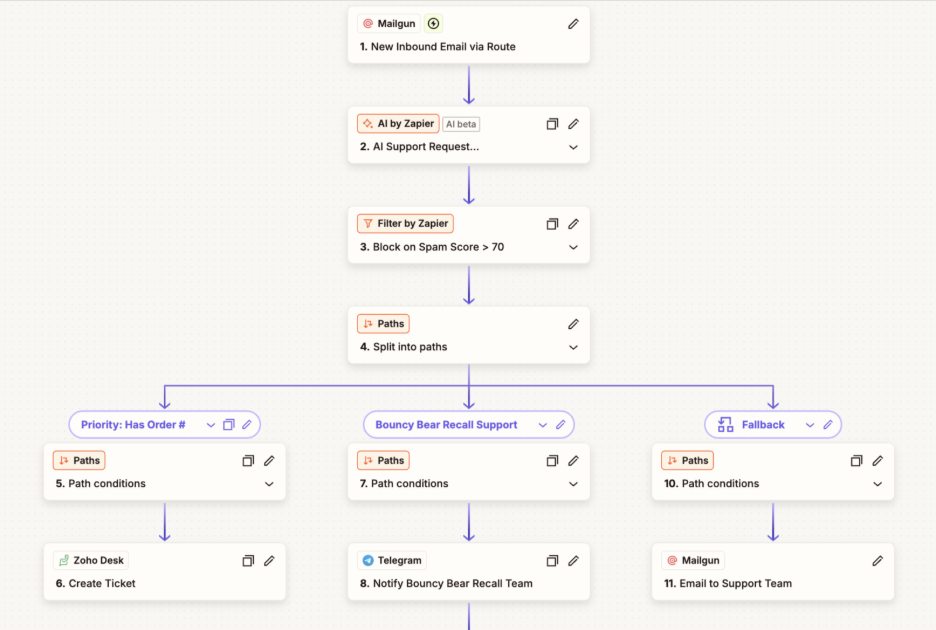
Starter template for creating Zendesk tickets for new Mailgune Route emails (no AI):
- Add AI to classify intent and priority.
3. Get proactive alerts when deliverability is at risk
When reputation drops or your domain/IP hits a blocklist, speed matters.
Instead of manually checking dashboards:
- Mailgun sends a deliverability alert (Optimize plan feature).
- Zapier catches it instantly.
- AI turns the raw payload into a short incident summary:
“Domain reputation decreased — likely due to elevated bounce rate over the past hour.”
- The summary is posted into Slack and logged into Google Sheets for follow-up.
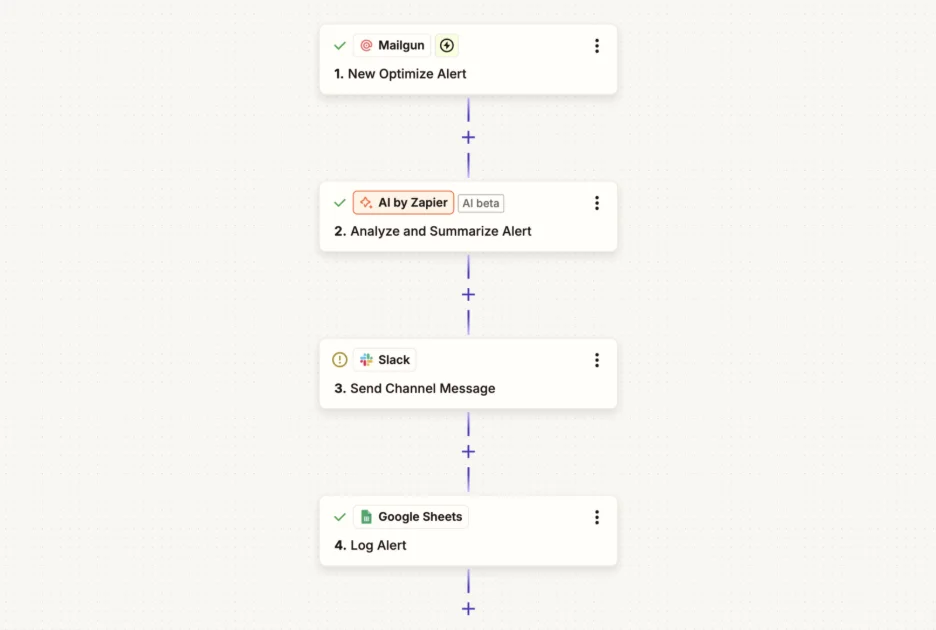
Starter template for getting slack notifications for new Mailgun deliverability alerts (no AI):
- Add AI to generate the incident summary.
4. Automatically remove failed addresses from HubSpot
Bounces pile up and hurt deliverability — especially permanent (“hard”) bounces.
With Zapier:
- Mailgun detects a permanent failure.
- Zapier finds the matching contact in HubSpot.
- Zapier removes that contact from your send list — automatically.
- AI can add a short note explaining the reason.
No more digging through logs, no more risky resends.
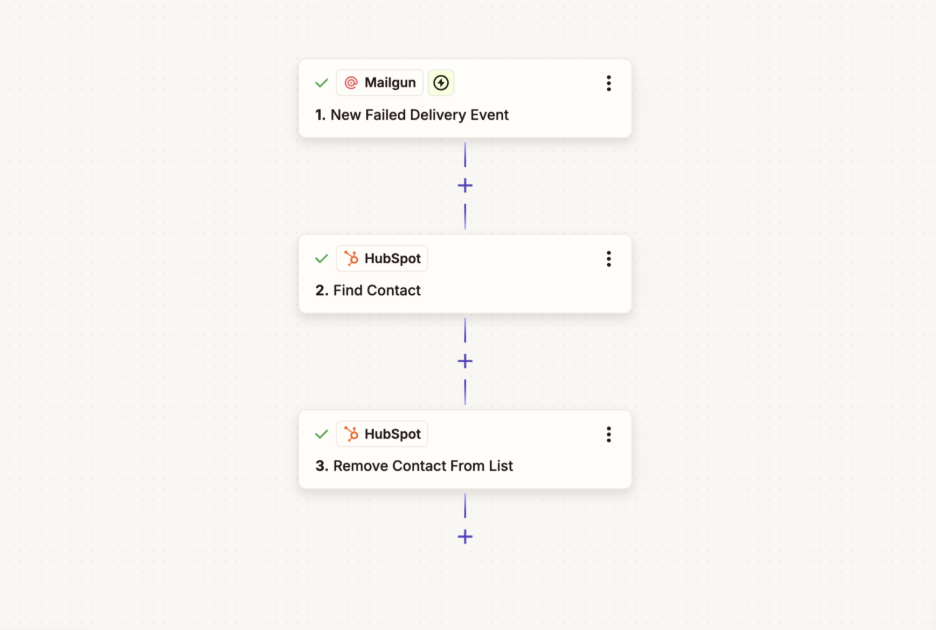
Starter template to remove HubSpot contacts for new Mailgun permanent delivery failures (no AI):
- Add AI to explain the failure and next steps:
“Explain why this email failed in one sentence using plain language. Specify if it is permanent or temporary.”
Smarter workflows. Less manual triage.
We designed this release to help teams spend less time reacting to email issues and more time focusing on meaningful work. The templates give you a fast starting point, and adding AI turns simple automations into informed decisions.
- Templates handle the workflow.
- AI interprets what’s happening.
- Together, they reduce manual triage and protect deliverability.
Try it today: Explore the Mailgun templates in Zapier