Link Validation

Fix broken links before subscribers see them

Every link in your email is a commitment to the reader. A broken URL, an empty CTA, or an insecure destination breaks that commitment before the message earns its click. Link Validation in Mailgun Inspect checks every link in your email HTML before you send — HTTP status, redirect chains, SSL certificate status, and more. 
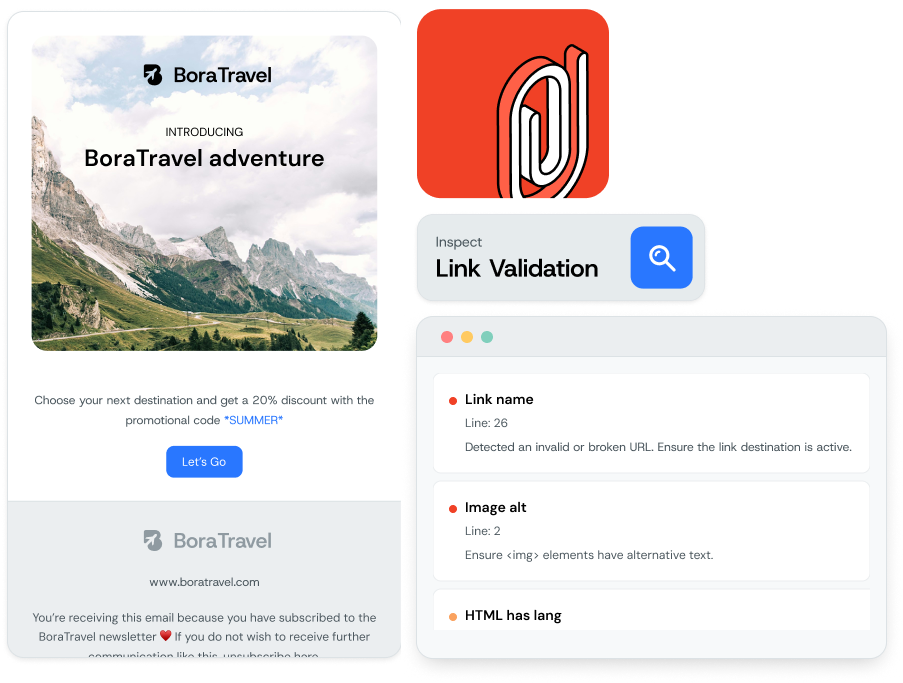
Image for Fix broken links before subscribers see them

QA Before Your Hit Send

Every broken link is a lost click

Links are where emails win or lose. When a link fails, the CTA fails with it. Broken URLs, empty buttons, and insecure destinations don’t just hurt engagement — they damage the brand perception you’ve built. Link Validation catches the issues that manual click-through QA misses or takes too long to find.

  • Catch URLs that return HTTP errors before CTAs lead to dead ends 

  • Flag empty links before subscribers click a button that goes nowhere 

  • Surface bad destinations before links point to the wrong location 

  • Identify SSL and HTTPS risks before links trigger browser security warnings 

Image for Every broken link is a lost click

How It Works

Know where every link goes before you send

Mailgun Inspect follows every link and reports what it finds including HTTP status, redirect chains with timing metrics, content type, content length, and SSL certificate status. If a destination is insecure, slow to resolve, or returns an error, you’ll see it before the send.

Track links

See which links resolve successfully and which return HTTP errors.

Catch latency issues

Spot long redirect chains that add latency before the final destination. 

Remove problems

Flag insecure destinations before they trigger browser security warnings.

Three Step Setup

Start validating links in your emails today

Links are where emails win or lose. Link Validation catches the issues that manual click-through QA misses or takes too long to find.

  •  1. Submit Your Email

    In the UI, paste your HTML, provide a hosted URL, or send your email to a unique test address. Using the API? Simply send your email’s full HTML content in a request to our robust API endpoint. Inspect creates a test input ready for analysis in seconds. 

  • 2. Review Your Link Health Report 

    Mailgun Inspect automatically follows every single link to its final destination. In the UI, you’ll see an interactive dashboard detailing HTTP status, redirect chains, SSL certificate status, and more, with powerful filters to sort by issue type. Via the API, you receive a structured JSON response containing the same rich data, ready for ingestion into your own applications. 

  • 3. Share, Fix, and Automate 

    From the UI, you can export a shareable PDF of the link report to collaborate with your team and create a clear record of what to fix. The structured API response empowers you to build custom automations—like flagging builds with broken links or logging issues in your own ticketing system—ensuring no bad links ever reach your customers. 

Image for Start validating links in your emails today

Frequently Asked Questions

Email link validation questions, answered

Email link validation checks each hyperlink in an email before it’s sent. It confirms the URL is correctly formed, resolves to an active destination, and returns a successful HTTP response. Mailgun Inspect runs link validation directly from your email HTML.

Link Validation checks for broken links, empty links, and bad destinations. It surfaces links that return HTTP errors like 404 or 500, links with missing or blank href values, and links that resolve to the wrong location. 

The API follows consecutive HTTP redirects from the original URL to the final destination, including timing metrics for each step. You can see where delays build up and verify the final destination is correct. 

Yes. Link Validation checks SSL certificate status for every link destination. It flags links pointing to insecure destinations and sites with expired or untrusted certificates. 

Submit your email by pasting the HTML directly, providing a URL where the HTML is hosted, or sending the email to a Mailgun-generated address. Tests run from the Inspect UI or via API. 

Yes. The API and UI have identical feature coverage. The API supports creating tests, retrieving results, reprocessing previous tests, listing historical tests with filters, and comparing results against CSV, XLS, or XLSX spreadsheets. 

Yes. Export identified issues as a PDF to share outside the platform. API users receive structured response data for use in their own reporting workflows. 

Link Validation is one of three check types in Mailgun Inspect. Inspect also covers image-related issues and accessibility concerns, so you can review all pre-send risks in one workflow.